> ## Documentation Index
> Fetch the complete documentation index at: https://jinshuju-20a27453.mintlify.site/llms.txt
> Use this file to discover all available pages before exploring further.

# 表单暂不可填写

## 错误提示说明

<img src="https://mintcdn.com/jinshuju-20a27453/T3R0aMcfYazCeIGp/next/attachments/ttV8Wtew92o7APk11Gf9tkL6.png?fit=max&auto=format&n=T3R0aMcfYazCeIGp&q=85&s=92fd062526a85cda9931ed96c331af21" alt="PC|表单发布|系统提示信息，背景为淡粉色。内容为：抱歉，该表单暂时不可填写" width="1074" height="74" data-path="next/attachments/ttV8Wtew92o7APk11Gf9tkL6.png" />

**填写页面提示：** 「抱歉，该表单暂时不可填写，如果你是表单的创建者，请登录后台查看原因。」

**查看位置：** 金数据后台 - 「套餐到期表单」查看具体原因

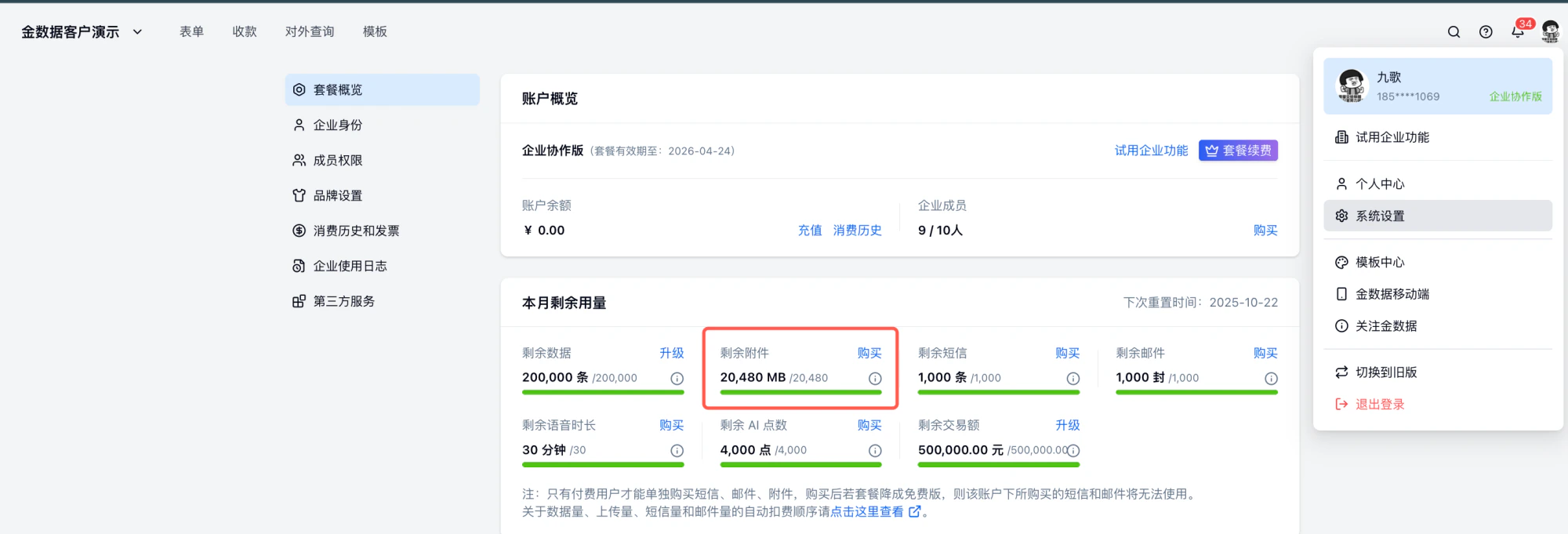
## **原因一：附件容量超限** 表单包含「收集附件」字段，已收集附件超过套餐容量。

<img src="https://mintcdn.com/jinshuju-20a27453/T3R0aMcfYazCeIGp/next/attachments/sRLsHwXgPdBXia5xVtnMtKWi.png?fit=max&auto=format&n=T3R0aMcfYazCeIGp&q=85&s=f7ef50343b6ae291092cb3e69eea3351" alt="PC|账户|账户概览页，企业协作版套餐显示附件容量超限状态" width="2000" height="681" data-path="next/attachments/sRLsHwXgPdBXia5xVtnMtKWi.png" />

解决方案：

* 升级套餐或购买附件包

* 等待下月配额重置（系统设置中查看重置时间）

* 删除收集附件字段，不使用附件收集字段（注：删除已有附件不会恢复收集量，并且会导致数据丢失且不可恢复，删除前请导出本地备份）

<table style={{ minWidth: "175px" }}>
  <colgroup><col style={{ minWidth: "25px" }} /><col style={{ minWidth: "25px" }} /><col style={{ minWidth: "25px" }} /><col style={{ minWidth: "25px" }} /><col style={{ minWidth: "25px" }} /><col style={{ minWidth: "25px" }} /><col style={{ minWidth: "25px" }} /></colgroup><tbody><tr><th colspan="1" rowspan="1"><p /></th><th colspan="1" rowspan="1"><p>免费版</p></th><th colspan="1" rowspan="1"><p><a target="_blank" rel="noopener noreferrer nofollow" href="https://jinshuju.net/plan_payment">专业版</a></p></th><th colspan="1" rowspan="1"><p><a target="_blank" rel="noopener noreferrer nofollow" href="https://jinshuju.net/plan_payment">专业增强版</a></p></th><th colspan="1" rowspan="1"><p><a target="_blank" rel="noopener noreferrer nofollow" href="https://jinshuju.net/plan_payment">企业基础版</a></p></th><th colspan="1" rowspan="1"><p><a target="_blank" rel="noopener noreferrer nofollow" href="https://jinshuju.net/plan_payment">企业协作版</a></p></th><th colspan="1" rowspan="1"><p><a target="_blank" rel="noopener noreferrer nofollow" href="https://jinshuju.net/plan_payment">企业高级版</a></p></th></tr><tr><td colspan="1" rowspan="1"><p>价格</p></td><td colspan="1" rowspan="1"><p>免费</p></td><td colspan="1" rowspan="1"><p>599 元/年</p></td><td colspan="1" rowspan="1"><p>2399 元/年</p><p>299 元/月</p></td><td colspan="1" rowspan="1"><p>4399 元/年</p></td><td colspan="1" rowspan="1"><p>7399 元/年</p></td><td colspan="1" rowspan="1"><p>23999 元/年</p></td></tr><tr><td colspan="1" rowspan="1"><p>套餐内容量</p></td><td colspan="1" rowspan="1"><p>100M/月</p></td><td colspan="1" rowspan="1"><p>1G/月</p></td><td colspan="1" rowspan="1"><p>5G/月</p></td><td colspan="1" rowspan="1"><p>10G/月</p></td><td colspan="1" rowspan="1"><p>20G/月</p></td><td colspan="1" rowspan="1"><p>50G/月</p></td></tr></tbody>
</table>

## **原因二：付费字段套餐到期**表单包含付费字段，但套餐已到期或试用期结束。

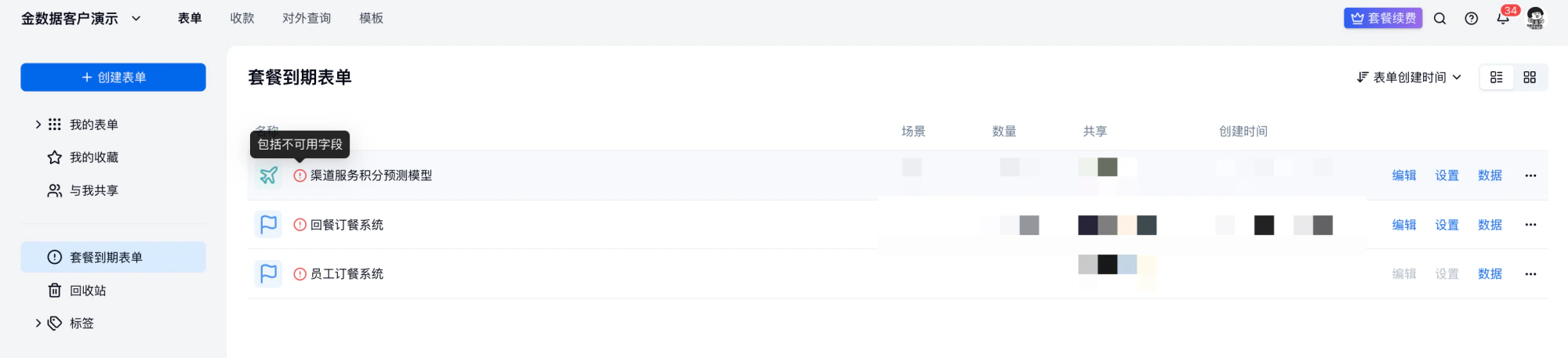
### 1. 工作台「套餐到期表单」查看套餐到期的变动，可以查看到当前账户套餐无法使用的表单。

<img src="https://mintcdn.com/jinshuju-20a27453/YnvErCp2PvxCFl_9/next/attachments/S4Q75wt9ypaArnuf9CWGvmwn.png?fit=max&auto=format&n=YnvErCp2PvxCFl_9&q=85&s=496fedda5149c643033daf937309796f" alt="PC|表单发布|套餐到期表单列表显示「编辑」「设置」「数据」入口" width="2000" height="457" data-path="next/attachments/S4Q75wt9ypaArnuf9CWGvmwn.png" />

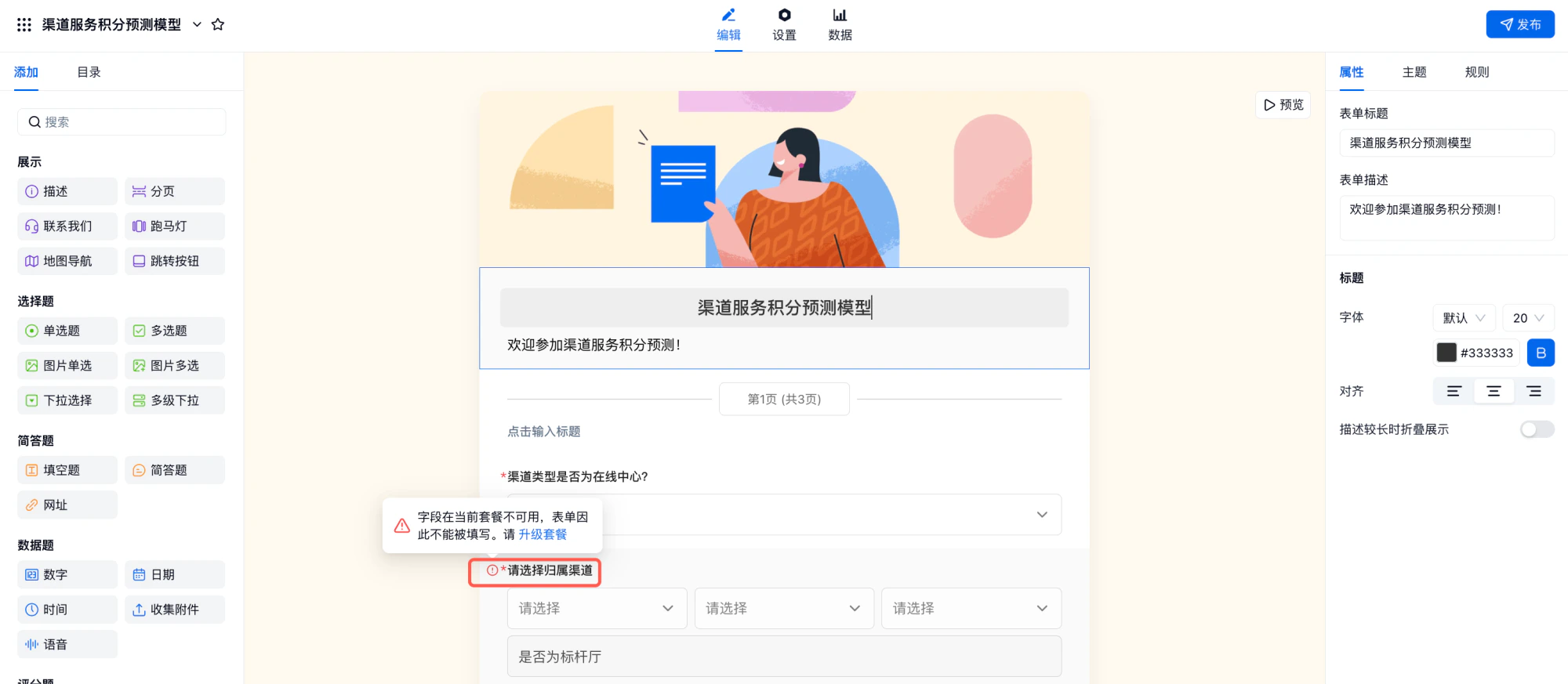
### 2. 在表单「编辑页面」，字段前出现红色感叹号提示「字段在当前套餐不可用，表单因此不能被填写。请升级套餐」

<img src="https://mintcdn.com/jinshuju-20a27453/PXjNpuVOxWvDlg9n/next/attachments/mrM8HkiKRBpijEanDVYFJyKb.png?fit=max&auto=format&n=PXjNpuVOxWvDlg9n&q=85&s=4073da483ba416e58b27e0b856f27f63" alt="PC|表单发布|编辑页提示字段在当前套餐不可用需升级套餐" width="2000" height="873" data-path="next/attachments/mrM8HkiKRBpijEanDVYFJyKb.png" />

### 解决方案：

* 续费套餐

* 在「套餐到期表单」中删除付费字段（注：删除字段，并且会导致数据丢失且不可恢复，删除前请导出本地备份）

## 原因三：表单创建者为企业子账户，且企业版本已经到期

由于非企业版不支持子账户功能，子账户创建的表单将无法正常使用。以下是两种解决方案：

1. **升级至企业版套餐**：升级后即可正常使用子账户功能。

2. **申请企业版试用**：如暂不升级，可联系在线客服协助处理。

###


This documentation is built and hosted on [Mintlify](https://mintlify.com), a developer documentation platform.