> ## Documentation Index
> Fetch the complete documentation index at: https://jinshuju-20a27453.mintlify.site/llms.txt
> Use this file to discover all available pages before exploring further.

# 企业微信机器人配置

> 示例背景：员工填写请假表单后，系统自动将请假内容发送到企业微信群里，并提醒直属上级及时处理。

## 配置步骤

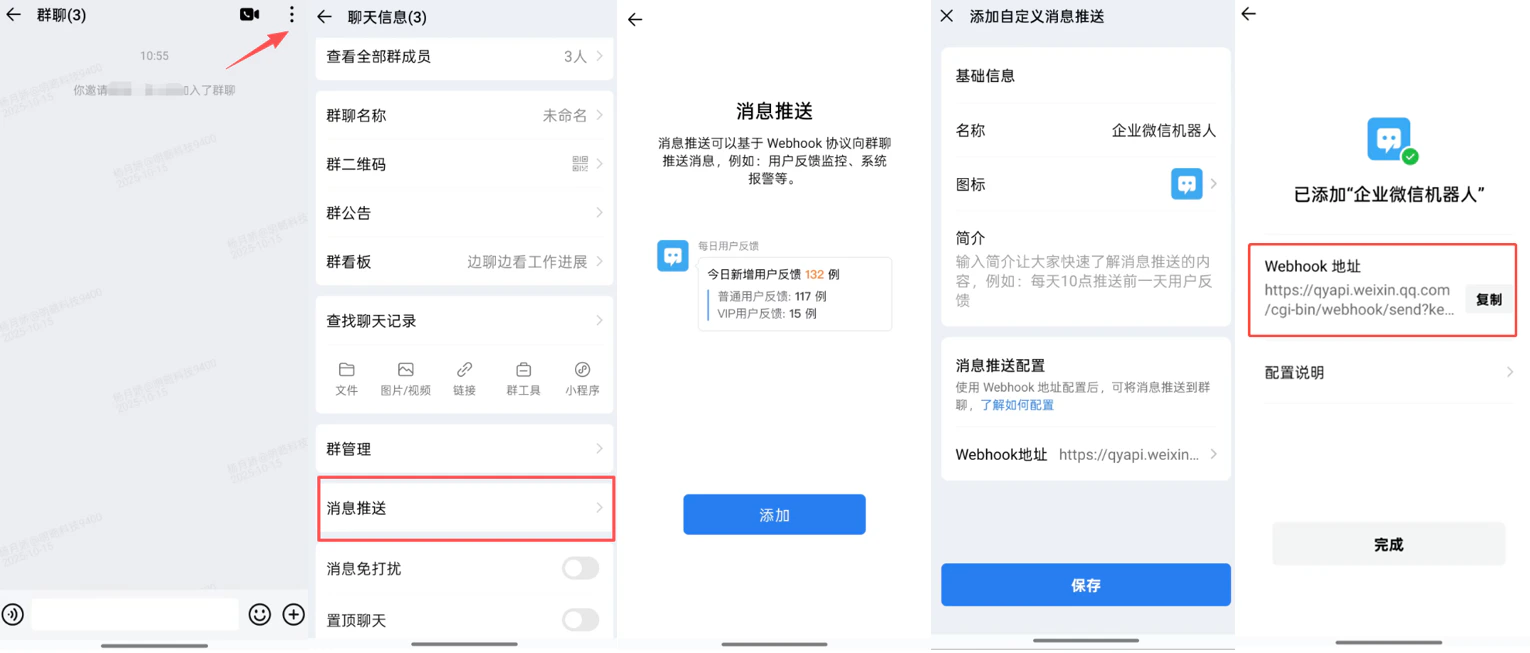
**第一步，先在企业微信群里创建一个企业微信机器人，并获取机器人的 Webhook 地址。**\
如下图所示，在 PC 端或移动端，打开一个内部群聊（外部群不支持）去创建机器人，机器人添加完成后就显示对应的 Webhook 地址。

<img src="https://mintcdn.com/jinshuju-20a27453/eFPaAnC3qZ-6meBS/next/attachments/KqQbZgReQxFRb4jugGHd6YTs.png?fit=max&auto=format&n=eFPaAnC3qZ-6meBS&q=85&s=b200b4a1fd0a29104c2d57a0626bc807" alt="PC|企业微信推送|企业微信设置，添加Webhook机器人地址" width="1530" height="653" data-path="next/attachments/KqQbZgReQxFRb4jugGHd6YTs.png" />

移动端

**第二步，创建自动化任务推送到企业微信群。**\
步骤：

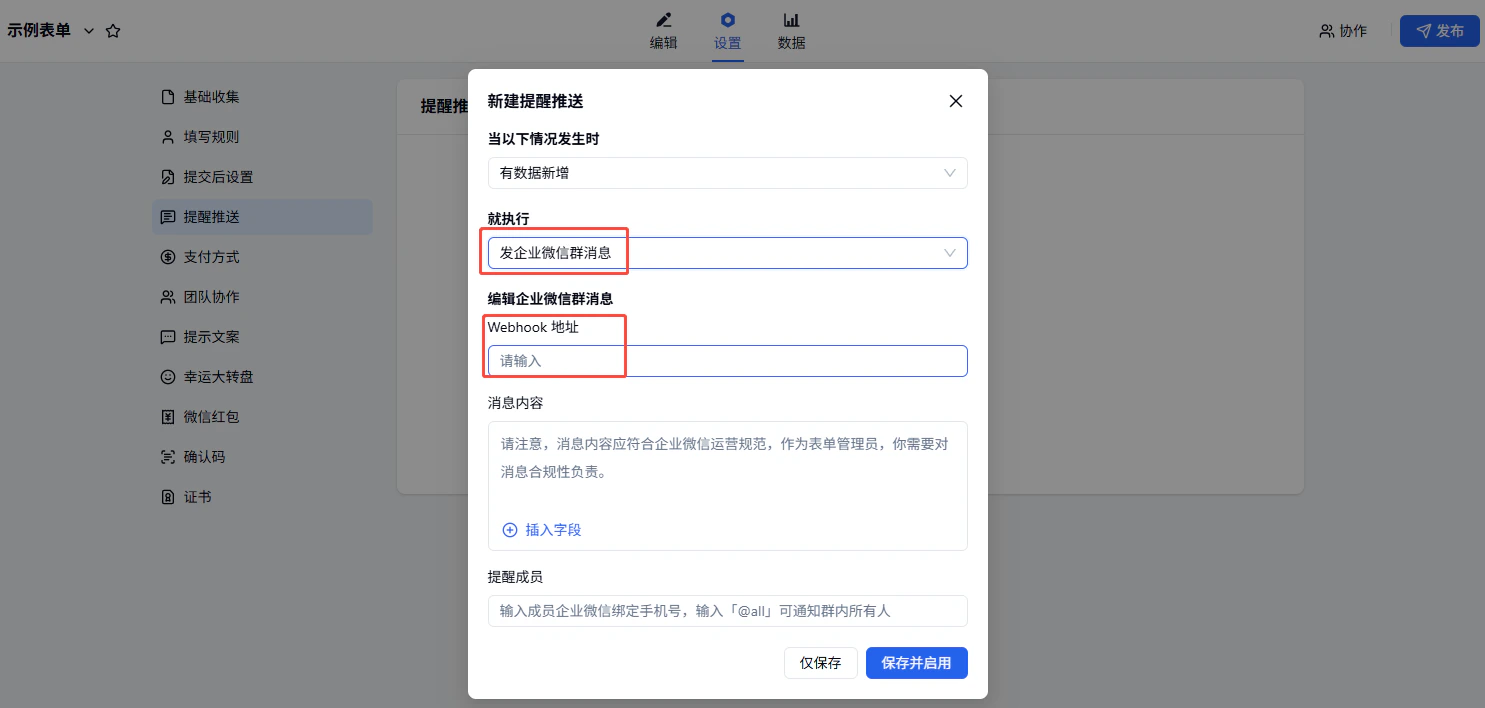
* 触发条件选择「有数据新增」，执行「发企业微信群消息」；

* 将企业微信群机器人的 Webhook 地址添加到「 Webhook 地址」中，编辑要发送的内容、设置企微中需要提醒成员的手机号；

* 任务配置完成，点击弹窗右下角「保存并启用」即可开启任务。

⚠️ 注意：可以输入群内成员企业微信绑定手机号，使用回车或空格区分多个，如果要通知群内所有人，请输入「@all」。

<img src="https://mintcdn.com/jinshuju-20a27453/IuRh1KD9bwx_ZiC0/next/attachments/8iWTUZxgp9PT1KhHffzp6Cun.png?fit=max&auto=format&n=IuRh1KD9bwx_ZiC0&q=85&s=4af85192fa4a3881fc41d80b42f281dc" alt="PC|企业微信|提醒推送设置配置企业微信「Webhook」地址参数完成推送" width="1485" height="708" data-path="next/attachments/8iWTUZxgp9PT1KhHffzp6Cun.png" />

***

## 资费介绍

自动化的资费介绍如下：

<table style={{ minWidth: "175px" }}>
  <colgroup><col style={{ minWidth: "25px" }} /><col style={{ minWidth: "25px" }} /><col style={{ minWidth: "25px" }} /><col style={{ minWidth: "25px" }} /><col style={{ minWidth: "25px" }} /><col style={{ minWidth: "25px" }} /><col style={{ minWidth: "25px" }} /></colgroup><tbody><tr><th colspan="1" rowspan="1"><p /></th><th colspan="1" rowspan="1"><p><strong>免费版</strong></p></th><th colspan="1" rowspan="1"><p><a target="_blank" rel="noopener noreferrer nofollow" href="https://jinshuju.net/plan_payment"><strong>专业版</strong></a></p></th><th colspan="1" rowspan="1"><p><a target="_blank" rel="noopener noreferrer nofollow" href="https://jinshuju.net/plan_payment"><strong>专业增强版</strong></a></p></th><th colspan="1" rowspan="1"><p><a target="_blank" rel="noopener noreferrer nofollow" href="https://jinshuju.net/plan_payment"><strong>企业基础版</strong></a></p></th><th colspan="1" rowspan="1"><p><a target="_blank" rel="noopener noreferrer nofollow" href="https://jinshuju.net/plan_payment"><strong>企业协作版</strong></a></p></th><th colspan="1" rowspan="1"><p><a target="_blank" rel="noopener noreferrer nofollow" href="https://jinshuju.net/plan_payment"><strong>企业高级版</strong></a></p></th></tr><tr><th colspan="1" rowspan="1"><p><strong>价格</strong></p></th><td colspan="1" rowspan="1"><p>免费</p></td><td colspan="1" rowspan="1"><p>599 元/年</p></td><td colspan="1" rowspan="1"><p>2,399 元/年</p><p>299 元/月</p></td><td colspan="1" rowspan="1"><p>4,399 元/年</p></td><td colspan="1" rowspan="1"><p>7,399 元/年</p></td><td colspan="1" rowspan="1"><p>23,999 元/年</p></td></tr><tr><th colspan="1" rowspan="1"><p><strong>发送到企业微信群机器人</strong></p></th><td colspan="1" rowspan="1"><p>❌</p></td><td colspan="1" rowspan="1"><p>❌</p></td><td colspan="1" rowspan="1"><p>❌</p></td><td colspan="1" rowspan="1"><p>✅</p></td><td colspan="1" rowspan="1"><p>✅</p></td><td colspan="1" rowspan="1"><p>✅</p></td></tr></tbody>
</table>


This documentation is built and hosted on [Mintlify](https://mintlify.com), a developer documentation platform.